
What the blackbox recordsWas die Blackbox aufzeichnet
Like a real drone with Betaflight, Propwash 0.5.2 can record every flight: sticks, setpoints, gyro, PID terms, motors and battery at every pass of the flight controller loop – 2 kHz with the default PID loop. The logs are real Betaflight blackbox logs (.bbl), so real tuning tools open them:
Wie eine echte Drohne mit Betaflight zeichnet Propwash 0.5.2 auf Wunsch jeden Flug auf: Knüppel, Sollwerte, Gyro, PID-Anteile, Motoren und Akku bei jedem Durchlauf der Regelschleife – 2 kHz mit der Standard-Regelschleife. Die Logs sind echte Betaflight-Blackbox-Logs (.bbl), also öffnen sie echte Tuning-Werkzeuge:
- Betaflight Blackbox Explorer – in the browser at blackbox.betaflight.com or as an app: every trace over time, the sticks, the motors and a spectrum of the noise.Betaflight Blackbox Explorer – im Browser unter blackbox.betaflight.com oder als Programm: alle Kurven über der Zeit, die Knüppel, die Motoren und ein Spektrum des Rauschens.
- PIDtoolbox – pidtoolbox.com: step response per axis (how fast and how cleanly the gyro follows the setpoint), noise by throttle and frequency.PIDtoolbox – pidtoolbox.com: Sprungantwort je Achse (wie schnell und sauber das Gyro dem Sollwert folgt), Rauschen nach Gas und Frequenz.
The flight model of Propwash reacts to PIDs, filters and rates like a real drone, so what you learn from the log goes straight back into the configurator.
Das Flugmodell von Propwash reagiert auf PIDs, Filter und Rates wie eine echte Drohne – was du aus dem Log lernst, trägst du direkt im Konfigurator ein.
Switch it onEinschalten
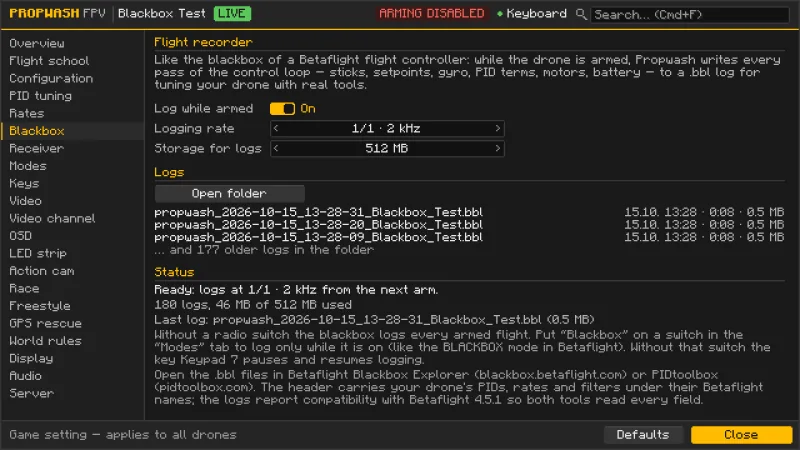
- Open the configurator (K) and go to the Blackbox tab.Konfigurator öffnen (K), Tab Blackbox.
- Set Log while armed to On. Leave Logging rate at 1/1 (every loop, about 4 MB per flight minute); 1/2 to 1/8 make smaller logs.Loggen, wenn scharf auf An. Lograte auf 1/1 lassen (jeder Durchlauf, etwa 4 MB pro Flugminute); 1/2 bis 1/8 ergeben kleinere Logs.
- Storage for logs caps the folder (128 MB to 4 GB, default 512 MB): before a new log starts, the oldest logs are deleted until it fits.Speicher für Logs begrenzt den Ordner (128 MB bis 4 GB, Standard 512 MB): Bevor ein neuer Log beginnt, werden die ältesten Logs gelöscht, bis er hineinpasst.
- Save. From now on every arm starts a new log and disarming ends it. The logs stay on your computer; nothing is sent to the server.Speichern. Ab jetzt beginnt jedes Scharfschalten einen neuen Log, Entschärfen beendet ihn. Die Logs bleiben auf deinem Rechner, nichts geht an den Server.
Only some flights: put Blackbox on a radio switch in the Modes tab, like the BLACKBOX mode in Betaflight – then the blackbox logs only while the switch is on (in a failsafe it always logs). Without that switch, the key Numpad 7 pauses and resumes logging; every arm starts with logging running.
Nur bestimmte Flüge: Blackbox im Tab Modi auf einen Schalter legen, wie den Modus BLACKBOX in Betaflight – dann loggt die Blackbox nur, solange der Schalter an ist (im Failsafe immer). Ohne diesen Schalter pausiert die Taste Numpad 7 die Aufzeichnung und setzt sie fort; jedes Scharfschalten beginnt mit laufender Aufzeichnung.
Fly a test logEinen Testflug fliegen
Good tuning logs are short (30 s to 2 min) and contain what you want to check:
Gute Tuning-Logs sind kurz (30 s bis 2 min) und enthalten, was du prüfen willst:
- Step response (P, D, feedforward): in Acro, short hard stick snaps on roll and pitch with the sticks released in between, a few flips and rolls.Sprungantwort (P, D, Feedforward): im Acro-Modus kurze, harte Knüppelschläge auf Roll und Nick, dazwischen loslassen, ein paar Flips und Rollen.
- Noise and filters: one slow throttle sweep to full and back, then quick punches.Rauschen und Filter: einmal langsam bis Vollgas und zurück, dann kurze Gasstöße.
- Prop wash: steep dives into your own air and hard turns.Prop-Wash: steile Sturzflüge in die eigene Luft und harte Kehren.
- I-term: long turns and fast straight flight with changing throttle.I-Anteil: lange Kurven und schneller Geradeausflug mit wechselndem Gas.
Open the logLog öffnen
Click Open folder in the Blackbox tab. The logs are in propwash/blackbox in your game directory, named propwash_YYYY-MM-DD_HH-MM-SS_<drone name>.bbl.
Im Tab Blackbox auf Ordner öffnen klicken. Die Logs liegen in propwash/blackbox im Spielverzeichnis und heißen propwash_JJJJ-MM-TT_HH-MM-SS_<Name der Drohne>.bbl.
- Blackbox Explorer: open the file (or drop it on the page). The header shows the firmware line “Betaflight 4.5.1 compatible (Propwash v…)” and your drone’s PIDs, rates and filters. Lay gyro and setpoint of one axis on top of each other and show the spectrum.Blackbox Explorer: Datei öffnen (oder auf die Seite ziehen). Der Kopf zeigt die Firmware-Zeile „Betaflight 4.5.1 compatible (Propwash v…)“ und PIDs, Rates und Filter deiner Drohne. Gyro und Sollwert einer Achse übereinanderlegen und das Spektrum einblenden.
- PIDtoolbox: load the file (PIDtoolbox decodes it with blackbox_decode), then look at the step response and the spectral analysis.PIDtoolbox: Datei laden (PIDtoolbox dekodiert sie mit blackbox_decode), dann Sprungantwort und Spektralanalyse ansehen.
Propwash is not Betaflight: the logs report compatibility with Betaflight 4.5.1 (header “Betaflight 4.5.1 compatible (Propwash v…)”, board “PROPWASH”) so that both tools understand and scale every field. Filters the flight model doesn’t have – dynamic notch, RPM filter, dynamic lowpasses – are 0 in the header.
Propwash ist kein Betaflight: Die Logs melden Kompatibilität mit Betaflight 4.5.1 (Kopf „Betaflight 4.5.1 compatible (Propwash v…)“, Board „PROPWASH“), damit beide Werkzeuge jedes Feld verstehen und richtig skalieren. Filter, die das Flugmodell nicht hat – dynamischer Notch, RPM-Filter, dynamische Tiefpässe –, stehen im Kopf auf 0.
Read it and tuneLesen und tunen
| What you seeWas du siehst | MeaningBedeutung | Change in the PID tuning or Rates tabIm Tab PID-Tuning oder Rates ändern |
|---|---|---|
| Step response rises slowly and stays below 1Sprungantwort steigt langsam und bleibt unter 1 | Too little P or feedforwardZu wenig P oder Feedforward | Raise P or FFP oder FF erhöhen |
| Step response overshoots well above 1 and ringsSprungantwort schießt deutlich über 1 und schwingt nach | Too much P, too little DZu viel P, zu wenig D | Lower P or raise DP senken oder D erhöhen |
| Gyro lags behind the setpointGyro folgt dem Sollwert verzögert | Feedforward too small, filters too lowFeedforward zu klein, Filter zu tief | Raise FF, raise the gyro or D-term lowpassFF erhöhen, Gyro- oder D-Tiefpass höher |
| Oscillation in dives and hard turns (prop wash)Schwingen in Sturzflügen und harten Kehren (Prop-Wash) | Too little DZu wenig D | Raise D, check I-term relaxD erhöhen, I-Relax prüfen |
| Broad noise above 100–200 Hz in the gyro spectrumBreites Rauschen über 100–200 Hz im Gyro-Spektrum | Motor and frame vibration, damaged propsMotor- und Rahmenvibration, beschädigte Props | Lower the gyro lowpass, swap damaged propsGyro-Tiefpass senken, beschädigte Props tauschen |
| Very busy D-term, warm motorsD-Anteil sehr unruhig, warme Motoren | D or the D-term lowpass too highD oder D-Tiefpass zu hoch | Lower D or the D-term lowpassD oder D-Tiefpass senken |
| I-term drifts far in long turnsI-Anteil wandert in langen Kurven weit | Wind, center of gravity or too little IWind, Schwerpunkt oder zu wenig I | Raise II erhöhen |
| Motors often hit 100 %Motoren stoßen oft an 100 % | Weak drone or very hard ratesSchwache Drohne oder sehr harte Rates | Lower the rates, use stronger partsRates senken, stärkere Teile |
Change one thing at a time, fly the same test again and compare.
Eine Sache auf einmal ändern, denselben Test noch einmal fliegen und vergleichen.
Fields and unitsFelder und Einheiten
| FieldFeld | ContentInhalt |
|---|---|
gyroADC[0–2] | Filtered gyro in °/s (roll, pitch, yaw)Gefiltertes Gyro in °/s (Roll, Nick, Gier) |
gyroUnfilt[0–2], debug[0–2] | Raw gyro before the lowpass (debug mode Gyro Scaled)Rohes Gyro vor dem Tiefpass (Debug-Modus Gyro Scaled) |
setpoint[0–3] | Setpoint in °/s, throttle of the mixerSollwert in °/s, Gas des Mischers |
rcCommand[0–3] | Sticks after the deadband (±500, throttle 1000–2000)Knüppel nach dem Totband (±500, Gas 1000–2000) |
axisP/I/D/F[0–2] | PID terms (D only on axes with a D gain)PID-Anteile (D nur auf Achsen mit D-Wert) |
motor[0–3], eRPM[0–3] | Motor output 0–100 % as a DShot value, motor speedMotorleistung 0–100 % als DShot-Wert, Motordrehzahl |
vbatLatest, amperageLatest | Battery voltage and currentAkkuspannung und -strom |
baroAlt, rssi | Barometer height, radio linkBarometerhöhe, Funkverbindung |
GPS | Position of the simulated GPS receiver around 0° N 0° E (the world has no real coordinates), speed and coursePosition des simulierten GPS-Empfängers um 0° N 0° O (die Welt hat keine echten Koordinaten), Tempo und Kurs |
flightModeFlags | Arm, Angle, Horizon, Airmode, 3D, failsafe, GPS rescue, beeper, blackbox switchScharf, Angle, Horizon, Airmode, 3D, Failsafe, GPS-Rettung, Piepser, Blackbox-Schalter |
QuestionsFragen
- No log? Is the blackbox switched on and saved in the tab? If the Blackbox function is on a switch, the switch must be on while you fly. The status line in the tab tells what the blackbox is doing.Kein Log? Ist die Blackbox im Tab eingeschaltet und gespeichert? Liegt die Funktion Blackbox auf einem Schalter, muss er beim Fliegen an sein. Die Statuszeile im Tab sagt, was die Blackbox gerade tut.
- Logs disappear? The storage limit was reached; copy logs you want to keep or raise the limit.Logs verschwinden? Die Speichergrenze ist erreicht; Logs, die du behalten willst, wegkopieren oder die Grenze erhöhen.
- Altitude or position hold? Betaflight 4.5 has no flag for them, so the log shows them as Angle.Höhe oder Position halten? Betaflight 4.5 hat dafür kein Flag, der Log zeigt sie als Angle.